Get Smarter with Solar: How using the mode scheduler on your monitoring app will save you more money
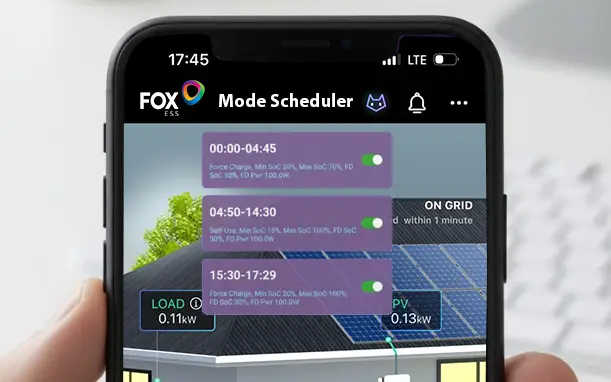
In the era of smart energy and sustainable living, the Mode Scheduler on your monitoring app is one of the most under-utilised tools that can make a real difference to your electricity bills. If you have time-of-use energy tariffs (where electricity costs vary at different times of the day), learning how to schedule your energy use smartly can mean big savings with very little effort.
🌙 What is the Mode Scheduler?
The Mode Scheduler in your monitoring app allows you to set specific times for your system to prioritise charging, discharging, or using grid energy based on your tariff pricing, the scheduler lets you build a plan that aligns with when electricity is cheapest, often overnight, and when your solar panels are producing the most during the day.
🌟 Why Use the Mode Scheduler?
1. Cut Your Energy Costs by Using Cheaper Night-Time Electricity
Many energy suppliers offer off-peak or night time tariffs where energy is significantly cheaper overnight.
With the Mode Scheduler you can:
✅ Charge your home battery at night when electricity is cheapest
✅ Run high-energy appliances (washing machines, dishwashers, EV charging) in low-cost periods
This means you’re buying energy when it’s cheapest and using it when you need it most, driving down your monthly bill.
2. Maximise Your Solar Production Automatically
Solar power is free, but it’s only available while the sun is shining.
The scheduler can:
🌞 Prioritise solar use during the day
🌙 Switch to cheaper grid energy at night
🔋 Manage battery charge/discharge smartly throughout the day
That means you reduce your reliance on expensive daytime grid energy and make the most of both your solar power and off-peak tariffs.
3. Automate Your Home’s Energy Use (No Manual Switching)
Once your Mode Scheduler is configured:
⚙️ Your system switches modes automatically
📅 You set it and forget it
📊 The app tracks performance so you can tweak schedules over time
No more guessing which mode to use or manually switching; it’s all done for you.
4. Enjoy Smarter EV Charging
If you have an electric vehicle, the Mode Scheduler can:
🔌 Prioritise EV charging during cheap overnight hours
🚗 Ensure your car is ready before morning
💸 Reduce fuel costs compared to daytime charging
EV charging can be one of the biggest energy draws in a home, so timing it right saves real money.
5. Tips for Getting the Most Out of Your Mode Scheduler
Here are some quick best practices:
- Know your tariff windows – check when your off-peak hours are and build your schedule around them.
- Pair battery charging with night tariffs – it’s usually cheaper to charge overnight than from solar alone during peak hours.
- Monitor and optimise – most apps give performance data, so review and refine your schedule monthly.
- Think ahead for seasonal changes – summer and winter solar production differs; adjust your schedule accordingly.
We have created a helpful step by step guide here. In just a few minutes you could be saving £££’s.